Remote IT support
Help with Windows, software, accounts, email and common user problems.
Business technology that works. Direct IT help for Edmonton homes, offices and local businesses—from computers and user accounts to printers, software, Wi-Fi and Microsoft 365.
Talk to a technician ↗Help with Windows, software, accounts, email and common user problems.
Scheduled visits for hardware, connectivity and issues that require hands-on service.
Computer setup, printer installation, mapping, scanning and peripheral support.
Email, Teams, OneDrive, account access and user setup for small businesses.
Router, firewall, switch and access-point configuration and troubleshooting.
Installation and support for commercial kiosks, point-of-sale equipment, scanners, peripherals and office technology. We confirm site requirements and the installation scope before work begins.
Yes. Many software and user issues can be handled remotely, while equipment and local connectivity issues may require an onsite visit.
Yes. Support is available for email, Teams, OneDrive, account access and common Microsoft 365 issues.
Yes. We assist with workstation setup, printer mapping, scanning, drivers, software and common connectivity problems.
Network cabling is offered as a separate professional service covering cable runs, termination, testing, labeling, racks and patch panels.
Workstations, shared printers, Microsoft 365 accounts and the office network for accountants, consultants, real estate and similar teams.
Front-desk computers, label and receipt printers, scanners and reliable Wi-Fi so the day runs on schedule.
POS hardware, receipt printers, back-office PCs and security cameras.
Laptops, email, file sharing and backups for owners who work from the truck, the job site or a home office.
Diagnosis, SSD installation ($70 + GST), clean Windows reinstalls and replacement planning.
Driver problems, network printing, scan-to-email and printers that drop off the network.
Sign-in problems, mailbox setup, shared calendars, OneDrive syncing and new user accounts.
Dead zones, unstable connections, router and switch setup, and structured network cabling.
Setting up new PCs, moving files and settings, and getting staff back to work quickly.
Malware removal, account security checks and practical advice to prevent repeats.
Onsite visits across the city, plus remote support for suitable software and account problems.
We also support businesses in St. Albert, Sherwood Park, Spruce Grove, Stony Plain, Leduc and Nisku, Beaumont, Fort Saskatchewan, and Morinville.
Call to discuss the users, equipment and current problem.
Call Us to Book Your Appointment ↗Edmonton and surrounding areas
Remote support available
Onsite visits by arrangement
Call to schedule service
| Service | Details | Price (CAD) |
|---|---|---|
| Onsite service | First-hour minimum | $80 + GST |
GST is extra on diagnostics, onsite service, virus removal and SSD installation. SSD drive cost is additional. We confirm applicable taxes, parts, scope and the total quote before work begins. Other repairs and installations are quoted after assessment.
Request service → See all common service pricesWe serve customers throughout Edmonton, St. Albert, Sherwood Park, Spruce Grove, Stony Plain, Leduc, Beaumont, Fort Saskatchewan, Morinville. Drop-off repairs are by appointment at our Edmonton home-based service location. Contact us before visiting for confirmation and drop-off instructions.
Onsite visits are available across these areas for suitable work; some repairs require workshop equipment. We confirm the service method, location, availability and quote before your appointment.
For suitable software issues, remote computer support is available across Canada and internationally. Every connection requires your permission.
Arrange your service →Explore photographs from related work and discuss the scope for your repair or installation.
Network cabinet cleanup: before & after →A commercial workspace with desktop workstations, a multifunction printer and installation equipment.
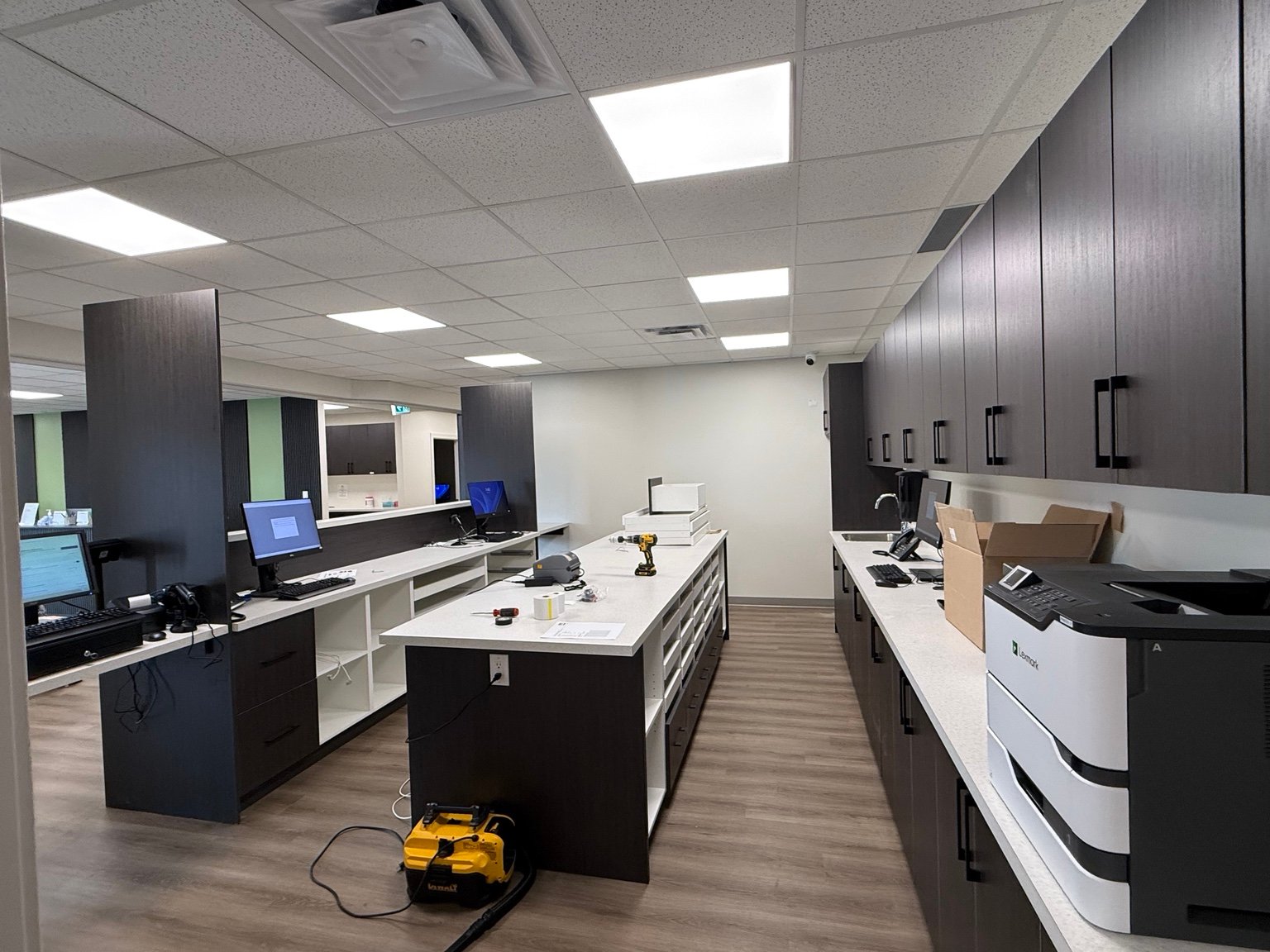
If the same issue caused by covered repair or installation work recurs within 30 days of completion, re-inspection and re-servicing have zero labour fees and zero diagnostic re-fee for that covered recurrence under our repair terms. Replacement hardware and components retain their full applicable manufacturer warranties; coverage and duration depend on the component and manufacturer.
Exactly 30 days on applicable completed repair and installation labour. New or unrelated faults, new damage and parts outside their applicable warranty are governed by the repair terms. Diagnostic-only work is not a completed repair.
Read the full repair termsFor a new workstation or a recurring office problem, describe the users, devices, software and services involved. Microsoft 365 setup, printer connectivity, email access and local network faults are assessed around your existing tools and authorized access.
Identify the files and systems that matter, who owns the accounts and how long your team can operate without them. Agree backup checks, restore testing and any required documentation before accepting the work. Read backup and transfer guidance.
Tell us whether the issue involves sign-in, sending, receiving or setup on a new device. Provider support or the account administrator may be required. Do not send credentials in the enquiry. Request business IT support.
Describe the affected users and devices, the error message, when the fault started and what still works. A printer outage on one workstation differs from a site-wide network failure. Include your business location, opening hours and any period when equipment can be taken offline.
Identify the account administrator or vendor contact who can authorize changes. Workstations, Microsoft 365, printers, cabling and POS equipment may have separate owners or support providers. Agree the work scope, testing and handover before changes to live systems.
Describe the recurring support you need. Availability, response arrangements and any ongoing scope must be agreed individually; a service enquiry does not establish a managed-service contract.